By Wealthbuilderz | Updated November 2026
Affiliate disclosure: As an Amazon Associate I earn from qualifying purchases. This article contains affiliate links, and we may receive a commission when you purchase through them at no additional cost to you.
Running a successful small business isn’t just about making sales. It’s also about getting your products into your customers’ hands accurately, efficiently, and without unnecessary expenses.
If you’re selling on Amazon, Etsy, eBay, Shopify, or your own website, shipping is a part of your operation that deserves attention.
And one piece of equipment that can make the process easier is a reliable thermal shipping label printer.
Unlike traditional inkjet printers, direct thermal printers don’t require ink or toner. They use heat-sensitive labels to produce shipping information and barcodes.
But not every shipping label printer is right for every business.
Today, Wealthbuilderz is comparing four options based on manufacturer specifications, operating requirements, and practical business applications. These are research-based recommendations; the printers were not personally tested for this article.
Quick Comparison: Our Four Picks
| Printer | Best for | Resolution |
|---|---|---|
| Rollo Wireless X1040 | Wireless ecommerce shipping | 203 dpi |
| MUNBYN RealWriter 130B | Budget-conscious startups | 203 dpi |
| Brother QL-1110NWB | Shared office packing stations | 300 dpi |
| Zebra ZD421 | Warehouse and inventory operations | 203 or 300 dpi |
1. Rollo Wireless X1040 — Best for Wireless Ecommerce Shipping

For an entrepreneur shipping orders from a home office, retail store, or dedicated packing area, the Rollo Wireless X1040 deserves serious consideration.
It offers Wi-Fi connectivity, Apple AirPrint support, and 203-dpi direct thermal printing. The manufacturer lists printing speeds up to 150 mm per second.
Another useful feature is compatibility with third-party direct thermal labels, giving business owners flexibility when purchasing shipping supplies.
What we like
- Wireless printing from compatible computers and mobile devices
- No ink or toner required
- Supports standard 4-by-6-inch shipping labels
- Accepts compatible third-party thermal label stock
- USB connectivity available as an alternative
What to consider
The X1040 is a more expensive option than many basic USB or Bluetooth printers. It also requires a suitable Wi-Fi setup for wireless printing, and it doesn’t use Bluetooth for direct print jobs.
Who should consider it? Ecommerce sellers who regularly ship packages and want to print from multiple devices without depending on one wired computer.
Check the Rollo Wireless X1040 on Amazon
2. MUNBYN RealWriter 130B — Best for Budget-Conscious Small Businesses

Not every business needs to spend hundreds of dollars on a shipping label printer.
If you’re just getting started selling products online, the MUNBYN RealWriter 130B is an option worth comparing.
It offers 203-dpi printing, a manufacturer-rated speed of 150 mm per second, and support for shipping labels up to approximately four inches wide.
The 130B connects through Bluetooth with supported Windows, iOS, and Android devices, while USB connectivity supports Windows and macOS.
What we like
- Designed for small-business shipping workflows
- Bluetooth printing from supported devices
- No ink or toner expenses
- Compact desktop footprint
- Useful for home-based sellers and small packing stations
What to consider
Connectivity differs by operating system. For instance, Mac users should plan around USB connectivity rather than assume the same Bluetooth workflow available on a phone.
Confirm compatibility with your preferred shipping platform before ordering.
Who should consider it? New Etsy, eBay, and Shopify sellers who need a basic shipping-label setup without a large initial equipment investment.
Check the MUNBYN RealWriter 130B on Amazon
3. Brother QL-1110NWB — Best for a Shared Office Packing Station
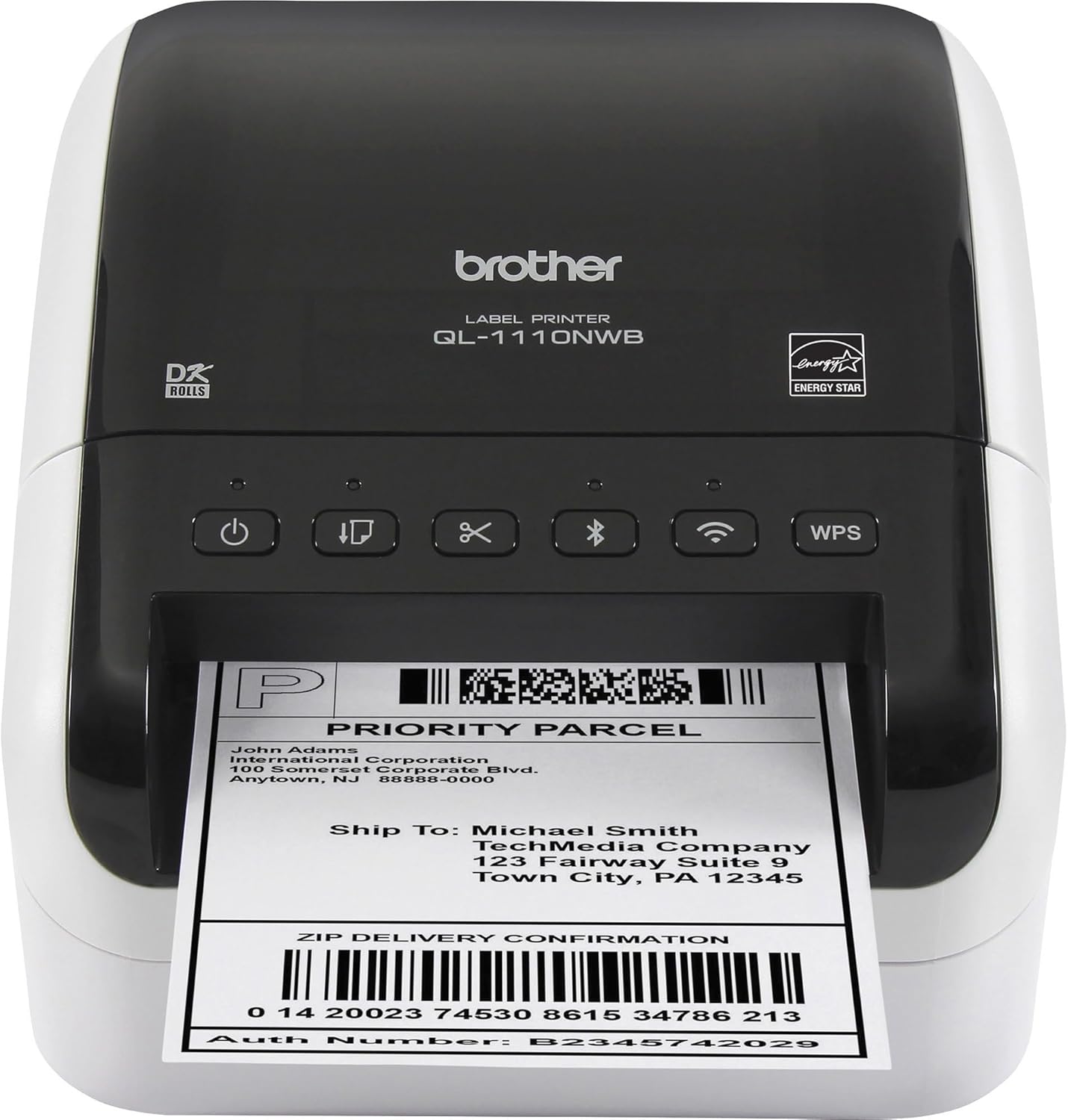
Sometimes a small business needs more than an ordinary shipping-label printer.
You may be printing package labels, address labels, inventory identification, and other business labels from the same workstation.
That’s where the Brother QL-1110NWB becomes interesting.
The printer supports labels approximately four inches wide, 300-dpi printing, automatic cutting, and multiple connectivity options, including USB, Ethernet, Wi-Fi, and Bluetooth.
What we like
- Multiple network connection options
- Higher resolution than the two 203-dpi printers above
- Automatic cutter
- Suitable for several types of office labels
- Useful for a shared office or packing area
What to consider
This model uses Brother’s DK label system. That means you need to consider compatible label supplies and their ongoing cost rather than comparing the purchase price alone.
Also, its advertised speed of up to 69 labels per minute refers to standard address labels, not necessarily full-size shipping labels.
Who should consider it? Small businesses that need one printer for shipping labels, address labels, and other office labeling tasks.
Check the Brother QL-1110NWB on Amazon
4. Zebra ZD421 — Best for Warehouse and Inventory Operations

If your business is moving beyond a small packing desk into a more structured shipping and inventory operation, consider the Zebra ZD421.
This model is offered in direct thermal and thermal transfer configurations, with 203-dpi and 300-dpi options. It supports barcode labeling, product identification, shipping and receiving, and inventory-related applications.
Depending on the configuration, additional networking and media-handling capabilities are available.
What we like
- Built for professional labeling workflows
- Direct thermal and thermal transfer variants
- Supports common barcode-printing applications
- Available with multiple connectivity configurations
- Appropriate for inventory and warehouse environments
What to consider
This isn’t necessarily the smartest purchase for an entrepreneur shipping just a handful of orders every week.
It may require more configuration, a higher equipment budget, and careful selection of the correct hardware variant.
Who should consider it? Businesses developing dedicated warehouse, inventory-control, or professional fulfillment workflows.
Check the Zebra ZD421 on Amazon
Five Things to Check Before Buying a Shipping Label Printer
Before spending your money, consider these questions.
1. How many packages do you ship?
If you ship only a few packages occasionally, an existing printer may already meet your needs. Regular shipping can make a dedicated thermal printer more convenient.
2. Where will you print your labels?
Some businesses work entirely from a desktop computer. Others need mobile printing or access from multiple packing stations. Choose the connectivity that fits how your business operates.
3. What label sizes do you need?
A 4-by-6-inch shipping label is common for parcel shipments. But if you’re also printing product labels, shelf labels, or inventory barcodes, confirm that the printer supports those sizes and your software.
4. What will the supplies cost?
Don’t evaluate a printer on purchase price alone. Calculate the cost of compatible labels, replacement accessories, and any required ribbons or specialized media.
5. Will your shipping software work with it?
Verify the complete workflow, including your computer or phone, shipping platform, label format, and printer driver or app. Print a sample label and check barcode readability before processing customer orders.
Frequently Asked Questions
Do thermal shipping label printers need ink?
Direct thermal printers don’t require ink or toner. They print by applying heat to specially coated label material. Thermal transfer printers, however, use ribbons, so check which type you’re buying.
Is 203 dpi good enough for shipping labels?
For many standard 4-by-6-inch parcel labels, 203 dpi is sufficient. More demanding small-text or dense-barcode applications may benefit from 300 dpi.
Can I print Amazon, Etsy, and Shopify shipping labels?
Many thermal printers support shipping labels generated by those marketplaces. However, compatibility depends on the device, software, label format, and selected printer model.
Are thermal labels permanent?
Not necessarily. Direct thermal labels can deteriorate from heat, prolonged sunlight, and certain storage conditions. For longer-term identification, consider appropriate thermal transfer labels.
Final Thoughts: Buy Equipment That Supports Your Business
Here’s the bottom line.
The best shipping label printer isn’t necessarily the most expensive machine or the one with the longest feature list.
It’s the printer that matches your workload, your budget, and how you actually run your business.
For a wireless ecommerce setup, consider the Rollo X1040. If you’re keeping startup expenses down, compare the MUNBYN 130B. For shared office labeling, the Brother QL-1110NWB offers more connectivity choices. And for an organized warehouse or inventory environment, the Zebra ZD421 deserves attention.
Build your business with intention. Invest in tools that solve real operational problems.
No emotion. No excuses. Just build.
— Wealthbuilderz
No responses yet